Storyboards & Concept Sketches
Humans are wired for stories. It’s how we make sense of the world, connect with each other, and remember what matters.
Sketches turn those stories into something a team can see together — clarifying problems, exploring possibilities, and building alignment before the work hardens. That matters most during strategy and scoping, when the questions are still open:
Strategy: Whose problem are we solving, and why does it matter?
Scope: What should the experience include, and what should it leave out?
By making the user, context, tension, and outcome visible early, storyboards help teams pressure-test assumptions while change is still cheap — and help product managers, engineers, researchers, marketers, and designers get to the same movie faster.
I learned how powerful that practice could be at ZURB, where I taught Interface Design Sketching through ZURB University (2013–2014) and hosted an Ideation & Sketching Workshop at Lean Startup Melbourne in May 2014 — generating, communicating, and rapidly evaluating product ideas through structured ideation and interface sketching.
Since then, the tools have evolved. High-fidelity software, templates, and generative AI make it easy to jump straight to polished screens. Sketches have been quietly disappearing from the designer’s workflow — and without them, we either rush past those early conversations about strategy and scope, or find them harder to have and harder to align on.
That’s why I built this agent skill: to bring sketching and storyboarding back to the moments when they matter most. One skill, two modes — a human-centered storyboard, or a UI-centered concept sketch. The prompt selects which one to make.
One skill, two modes
Storyboard mode makes the human experience visible — the person, context, tension, turning point, and outcome. Best for research, journeys, use cases, service experiences, and future-state narratives.
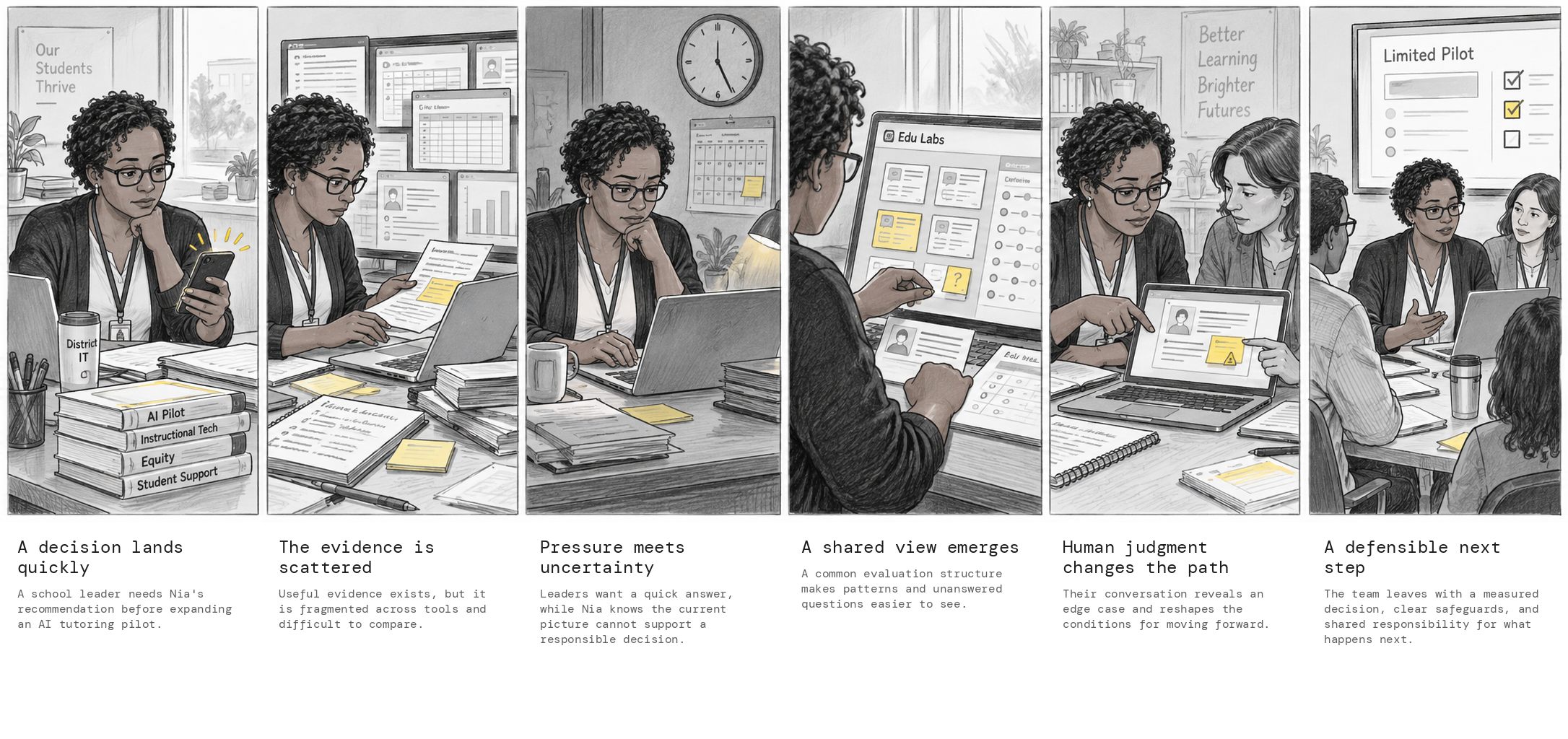
Example storyboard — from scattered evidence to a defensible next step.
Concept sketch mode makes the product experience visible — interface structure, interaction, sequence, and scope. Best for onboarding, navigation, developer experiences, product concepts, and before-and-after flows.
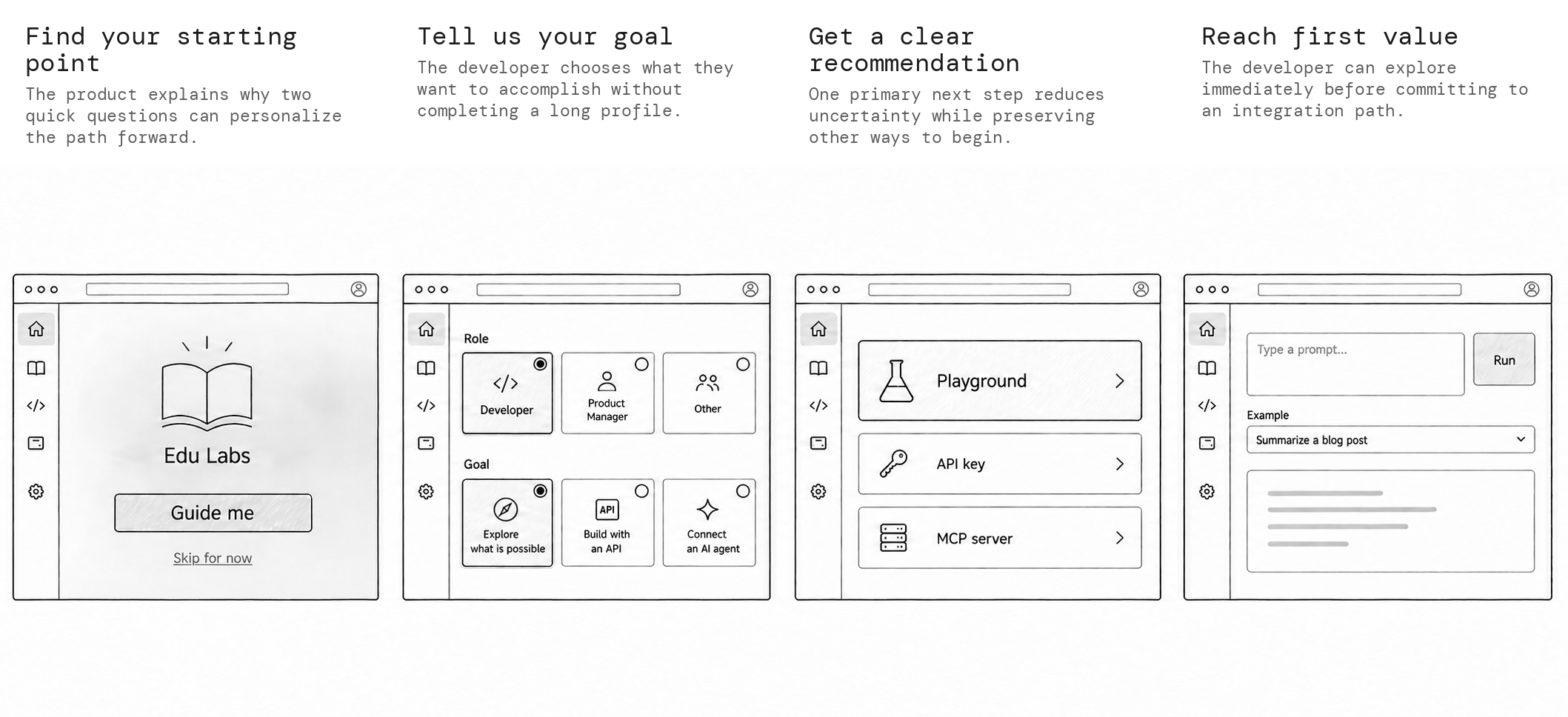
Example concept sketch — guided developer onboarding, from starting point to first value.
Both are conversation tools, not final designs. Use a storyboard to align on the human experience. Use a concept sketch to align on the product experience.
How it chooses
If the request is clearly about people and their experience, the skill uses storyboard mode. If it’s clearly about screens and interactions, it uses concept sketch mode. It only asks a clarifying question when both are plausible and the choice would change the output — and it doesn’t create both by default.
Shared workflow
Both modes share a lightweight approval loop so teams align on the story or flow before any artwork is generated:
- Understand — audience, central idea, mode, constraints, and source material
- Propose — panel or frame count, with a succinct title and one-sentence description for each
- Approve — wait for explicit approval or revisions
- Generate — low-fidelity artwork, without caption text baked into the illustrations
- Compose — place artwork into a consistent layout; typeset titles and descriptions in DM Mono
- Review — continuity, legibility, consistency, unsupported claims, and exact wording
Default delivery is one shareable composite PNG plus a short text transcript of the panel titles and descriptions. Individual panels only when asked.
Visual system
The two modes should feel like one family while staying easy to tell apart:
- White or warm-white canvas with generous whitespace
- Monochrome pencil or ink linework, restrained gray shading
- One accent color used sparingly to direct attention
- Consistent panel size, borders, and caption placement
- Intentionally low fidelity — no polish that implies the design is done
External titles and captions use DM Mono. UI text inside sketches stays visually distinct so explanation and interface don’t blur together.
How to install
- Download the skill
- Open a new agent chat and attach the downloaded file.
- Ask it to install the skill — for example: “Install this skill so I can use it.”
That’s it. Once it’s installed, you can call it by name in any prompt.
If you want the whole team to have it, ask the agent to install it for the project so it’s shared with everyone.
How to use
Name the skill, say which mode you want, and ask it to propose the structure before generating.
Storyboard prompt
Use the Storyboards and Concept Sketches skill.
Create a 6 panel storyboard about [topic or experience].
Audience: [who needs to understand it]
Central idea: [what viewers should understand or remember]
Source material: [notes, link, research, or attached artifact]
Constraints: [claims to avoid, people to include, format, or tone]
Start by proposing the panel structure for approval.
Concept sketch prompt
Use the Storyboards and Concept Sketches skill.
Create a concept sketch for [product idea or workflow].
User: [primary user or role]
Outcome: [what the user should accomplish]
Starting point: [current screen, trigger, or entry path]
Structure: [single screen, before and after, linear, or branching]
Constraints: [frame count, device, existing UI, or scope boundary]
Start by proposing the frame structure for approval.
Short prompts that work well
Turn this research insight into a 6 panel storyboard. Propose the arc first.Create a before and after concept sketch showing how this onboarding could become clearer.Turn this screenshot into a monochrome concept sketch. Preserve navigation, hierarchy, and key UI elements.Create a storyboard of the current experience, then stop. I will request a concept sketch separately if needed.The skill will propose panels or frames first, wait for your approval, then generate a low-fidelity composite you can share.
What success looks like
A polished image that tells the wrong story is not successful. Before delivery, the skill checks that the mode is clear, the central idea lands in one pass, every panel advances the narrative or interaction, people and screens stay continuous, captions match the approved wording, and the result stays intentionally low fidelity.
These visuals exist so teams can get to the same movie faster — not to estimate impact, lock implementation, or declare the design finished.